UX/UI · 2023
homee App User Testing
Design and User Testing for homee's Smart Home App
In the early days of the homee app, I worked on the design concept together with a front-end developer who is also responsible for UX/UI at homee. The UX structure developed during that phase remains the foundation of the released app to this day.
My focus was on scenario-based user testing: Over the course of twelve weeks, we developed four task flows, recruited testers through our own social media campaigns, and tested the flows with approximately 110 users using the online tool Maze and through qualitative shadowing.
PERIOD
Jan. 2023 - April 2023
TEAM
Together with UX/UI designers and front-end developers from homee
MY ROLE
Concept Development, Mock-ups, UX Research, Ads, User Testing & Analysis
TOOLS
Figma, Maze

01 THE RESULT
I developed the app's basic structure during this phase, and it largely proved effective during testing:
Three of the four user flows worked right away.
Although a few changes have been made to the user interface since then, the app's framework is still based on the structure I developed back then.
10
Qualitative User Testing
100
Testers via the online testing tool Maze
4
Task Flows as Clickable Prototypes
3
Users were able to complete 4 of the tasks on their first try
12
Weeks of testing, from storyboard to evaluation
02 THE TESTING
It took twelve weeks to go from the storyboard to the evaluation. I designed the entire process, from planning to analysis, including the campaign we used to recruit testers.
First, we defined scenarios, created screens and tasks, and recruited testers. In an internal pre-test, we ironed out initial errors and ambiguities. Afterward, 100 testers completed the tasks in Maze. Using their results, we adjusted the click-through mockups and, finally, conducted another qualitative test of the concept: through shadowing with an additional 10 people.
BASIS
Concept &
Tester Recruitment
Scenarios, screens, and four tasks as a clickable prototype. At the same time, testers were recruited via ads, a landing page, and a questionnaire.
INTERN
Preliminary Tests
Testing with Customer Service Staff:
Resolve initial errors and ambiguities before the full-scale testing begins.
Adjusting clickable prototypes
100 TESTER
Remote-Test in Maze
1 Week to Test:
The four tasks, evaluated based on success rate, stumbling blocks, and user group.
Adjusting clickable prototypes
10 TESTER
Shadowing
We conducted another qualitative test of the modified clickable prototypes on-site using shadowing with 10 additional participants and performed a final evaluation.
THE SCHEDULE

03 THE TESTERS
The app is designed to work well even without prior knowledge. That’s why we were primarily looking for people with little smart-home experience, and this was also mentioned in some of the ads. We used a questionnaire to assess how much experience the applicants had. Based on this, we selected the testers, assigned them to three personas, and later evaluated the results according to these personas.
“Roommate”
Not tech-savvy;
lives in a smart home but doesn't set anything up themselves. Just turns things on and off—like the lights, for example.
“Average Joe”
Interested in technology;
sets up devices on his own, but isn't particularly into smart homes.
“Specialist”
Very tech-savvy; deep into the topic, wants to automate as much as possible and builds many of his own automations.
THE CAMPAIGN
I designed custom ads for Facebook and Instagram. The visuals highlight typical smart-home scenarios: security, fire safety, pets, and checking in on your home while you’re away. A consistent tagline—“Smart Home Testers Wanted!”—ties them all together.


04 THE TASKS
Each task simulates a situation from everyday life in a smart home. We tested the workflows, not the final design. It was clear from the start that the user interface would still change. For this reason, I’ve only included wireframes here to illustrate the workflow.
Task 1: Control the lighting
Add a kitchen lamp, create a favorite color called “Ice Blue” or replace “Rose Red,” change the color, and
dim it to 60%. Tested in two variations.

Task 2: Interpreting the Graph
What was the noise level of the “Netatmo Station” on March 17, 2022, at 5:34 p.m.?
The issues:
Although the path to the value was set up correctly, it was unclear in three places: The slider with the attributes at the top was not recognized as a selection (A), the value being sought was not clearly readable in the graph (B), and it was not clear that the time period, date, and time could be changed (C).

Task 3: Add a Device to a Group
Create a group called “Kitchen Lighting,” pair the “Philips Hue White,” add it to the group, and check whether it appears there.

Task 4: Smart Widgets
Add a “Light” smart widget to your Home screen.

05 THE HOMEE APP TODAY
The basic structure and menu navigation of the current app stem from this phase. The main change has been to the user interface. The graphs in the detail view were redesigned because testing showed that they were confusing—exactly where Task 2 ran into trouble.
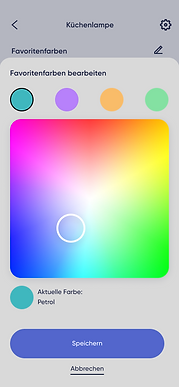
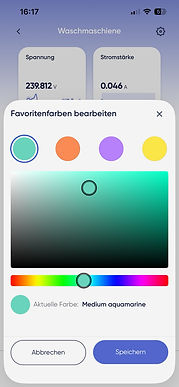
On the left are the screenshots from the clickable prototype we used for testing; on the right are the same sections in the app released today. I created the test screenshots and the structure; I was only partially involved in the app’s current UI design.
Home
CLICKABLE PROTOTYPE TEST
CURRENT APP


Device List
CLICKABLE PROTOTYPE TEST
CURRENT APP


Device Details
CLICKABLE PROTOTYPE TEST
CURRENT APP


Select Favorite Color
CLICKABLE PROTOTYPE TEST
CURRENT APP
Create a group
CLICKABLE PROTOTYPE TEST
CURRENT APP


Group details
CLICKABLE PROTOTYPE TEST
CURRENT APP

