STRATEGY · UX/UI · 2022 - PRESENT
stromee App & Customer Portal
App & Customer Portal for stromee Customers
The stromee app and customer portal serve as the central hub for customers: Here, they can view their contract, track their usage, enter meter readings, and access all documents—on their own and at any time.
PERIOD
June 2022 - Sept. 2026
TEAM
The sole designer, working in close collaboration with the development team
MY ROLE
Design, Analysis, Concept, Strategy, Presentation
TOOLS
Figma

01 STARTING POINT
The goal was to create a fully digital customer experience: everything related to the contract should be accessible through an app or the customer portal. This also allows stromee to reach its customers directly within the app via banners—for example, to promote special offers or share important notices.
I designed and developed the app from the ground up, and over time, its feature set was expanded step by step.
02 CONCEPT
Many customers have more than one contract: electricity and gas for the same apartment, or electricity for multiple addresses. The challenge was to present all these contracts clearly while also making it easy to switch between them quickly. The solution is the dashboard—both an overview and the starting point for navigation.
TWO APPS — ONE COMPONENT LIBRARY
Another challenge was the layout. To keep development effort as low as possible, we wanted to build, use, and expand a shared component library for the stromee and homee apps . The goal was therefore to find a dashboard layout that works for both an energy provider’s app and a smart home app. To do this, I compared various scenarios from both apps and identified common and differing elements.
It eventually became clear that homee needed a different kind of dashboard. Although we were able to standardize some components, the requirements of the two apps were ultimately too different for a unified dashboard layout.

FINAL STRUCTURE

03 THE STROMEE APP AT A GLANCE


04 FEATURES IN DETAIL

BULLETIN BOARD
The dashboard is the app’s starting point. Here, customers can view all their contracts along with their respective statuses—and quickly access the contract they’re looking for.
They also get a brief overview of the latest news and can use quick actions to add their meter reading right away.
Through banners, stromee can also quickly and easily inform its customers about promotions or important information regarding their contracts.
CONTRACT: DETAILS
In the “Details” section, customers can find all the information about their contract—and can adjust many settings themselves. They can switch between multiple contracts using the dropdown menu at the top.


CONTRACT: METER READINGS
On the “Meter Readings” tab, customers can see all previous meter readings, with a note on who submitted them, and can enter new ones directly.
Fixed numeric fields with decimal places make entries unambiguous and prevent typos.
CONTRACT: DOCUMENTS
Invoices and contract documents are organized chronologically in the “Documents” tab. Customers can open, share, or download them directly in the app.



USAGE & CUSTOMER SERVICE
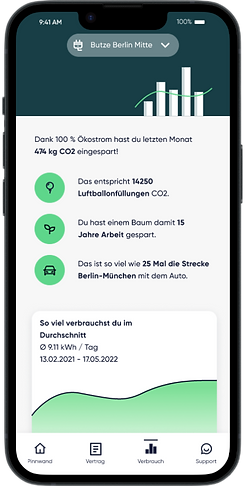
In the “Usage” section, customers can see how their electricity usage has changed over time for each contract.
To make the numbers more tangible, key metrics put them into context: The amount of CO₂ saved is translated into everyday comparisons, such as the work of a tree or car trips from Berlin to Munich.
Customer service is accessible from anywhere in the app, regardless of the contract. Here, you’ll find links to answers to frequently asked questions and, of course, customer service contact information along with service hours.
ACCOUNT
Customers can access their account by tapping the person icon on the dashboard. Here, they can manage everything that isn't tied to a specific contract: email addresses for all contracts, login credentials, and the app's language.

05 APPSCREENS


06 WEBAPP
The web app offers all the features that are also available to customers in the mobile app.
BULLETIN BOARD

CONTRACT: ACCOUNT


CONTRACT: METER READING


ACCOUNT: DOCUMENTS

USAGE & SUPPORT


ACCOUNT

