STRATEGY · UX/UI · 2026
Modular System for Invoicing
Modular system for dynamically generated invoices
With an ever-increasing number of new products, partners, and requirements, stromee’s existing invoices were reaching their limits. They weren’t flexible enough, and they also needed to be revised in other areas to make them easier to understand.
I therefore redesigned the invoices and developed a modular system. Reusable modules are used to create invoices for different needs—for example, for residential, business, or partner customers. They can be easily customized, and new requirements can be quickly incorporated and implemented.
The modules were implemented in Storyblok, and from there, the invoices were generated as PDF files.
PERIOD
Feb. 2026 - June 2026
TEAM
The only designer, working in close collaboration with the development team
MY ROLE
Design, Analysis, Concept, Strategy, Presentation
TOOLS
Figma

01 STARTING POINT
The invoice is the touchpoint that every customer sees on a regular basis, and it is also a legally binding document. At stromee, new requirements were constantly being added. However, the existing invoice was designed for a single scenario: a residential customer, electricity, and digital meter reading.
02 WEAKNESSES OF THE OLD INVOICE
Reusability
-
High maintenance effort for current products -> Changes must be applied individually to each product
-
Adding further products also involves a lot of effort
Printability
-
Lots of white space, many pages: large header, large footer, no table breaks, no “shifting” of content
-
High ink consumption due to many colored areas
Clarity
-
Calculation structured in a way that is not entirely clear in some cases
-
Explanations are missing in some cases, or are not clear
Sample pages from the original invoice design:


03 NEW REQUIREMENTS
New Products & Customer Groups:
Icons, usage data & content are required for different products & customer types
Partner
Invoices:
Partners addressed as “Sie,” with their own phone number, and customers who expect paper invoices
Legal
Special Cases:
Tax relief, e. g.
§ 22 of the Energy Act need only be reported for affected contracts
04 THE MODULAR SYSTEM
Instead of many templates, there is a modular system consisting of modules and a set of rules that assemble them.
The invoicing project reads the data for each invoice, selects the appropriate modules based on the rules, and populates them. Each module belongs to one of three types.
All possible modules for the current invoices are displayed on the right.
Cover Page
To keep the invoice as simple as possible, I deliberately placed the layout variations and the main differences between the invoices on the cover page. That’s where the design differs for residential, business, and partner customers; that’s where the respective seals appear; and that’s where customers are addressed personally. Aside from the cover page, the only other place where customers are addressed personally is on the last page. All pages in between do not include a personalized greeting and have the same structure for all invoices.
The Modules
The invoice consists of 3 types of modules:
Fixed Modules
The module appears on every invoice and is populated with the data from that specific invoice.
e.g., energy costs, meter readings
Modules with Variants
The module is always displayed, but there are different variants of it. The rules determine which variant is displayed.
For example: Invoice Overview—Credit Memo vs. Additional Payment, or SEPA vs. Self-Pay
Optional Modules
The module is not displayed by default, but only when the rules require it.
e.g., electricity mix, CO₂ cost allocation
Header & Footer
The header appears on every page of the invoice starting with page 1.
The footer, on the other hand, appears only on the cover page and not on the following pages.
Table Breaks
To avoid unnecessary white space, I have established rules regarding the minimum number of lines after which a table may break, the minimum number of lines that must appear on a page, and the minimum amount of white space on a page before a new table may begin.

05 THE COVER PAGE
The cover page alone depends on four characteristics. If designed as fixed templates, that would mean 28 cover pages that would have to be designed individually, coordinated, and updated every time the text changed. In the modular system, each characteristic controls only the module it affects.

06 HOW AN INVOICE IS STRUCTURED
Drei Beispielrechnungen aus demselben Baukasten.
INVOICE DETAILS
Customer Type
Residential
Product
Electricity
Balance
Credit Note
Contract Status
In Delivery
Payment Method
SEPA Direct Debit
APPLIED RULES
Residential Customer
→ Addressed as “you”
Electricity
→ Header with electricity icon, household comparison based on number of people, price breakdown, electricity mix
Credit
→ At a glance: “Credit,” green invoice overview
SEPA
→ Note regarding refunds via direct debit account
Active Service
→ Installment at a glance, installment & payment schedule


INVOICE DETAILS
Customer Type
Business
Product
electricity
Balance
Balanced
Contract Status
in Delivery
Payment Method
self-payers
RULES APPLIED
Business Customer
→ Addressed as “You,” company name in the address block
Electricity
→ Header with electricity icon, price breakdown, energy mix
Balanced
→ At a glance: “Additional payment/credit,” green invoice summary
Self-Paying Customers
→ Note regarding deadlines for paying the installment
Active Service
→ Installment at a glance, installment & installment schedule


INVOICE DETAILS
Customer Type
Partner Customer
Product
Gas
Balance
Additional Payment
Contract Status
Terminated
Payment Method
SEPA Direct Debit
RULES APPLIED
Partner Customer
→ Address: “You” & “Hi,” partner badge, partner number
Gas
→ Header with gas icon, household comparison by m², CO₂ cost breakdown
Additional Payment
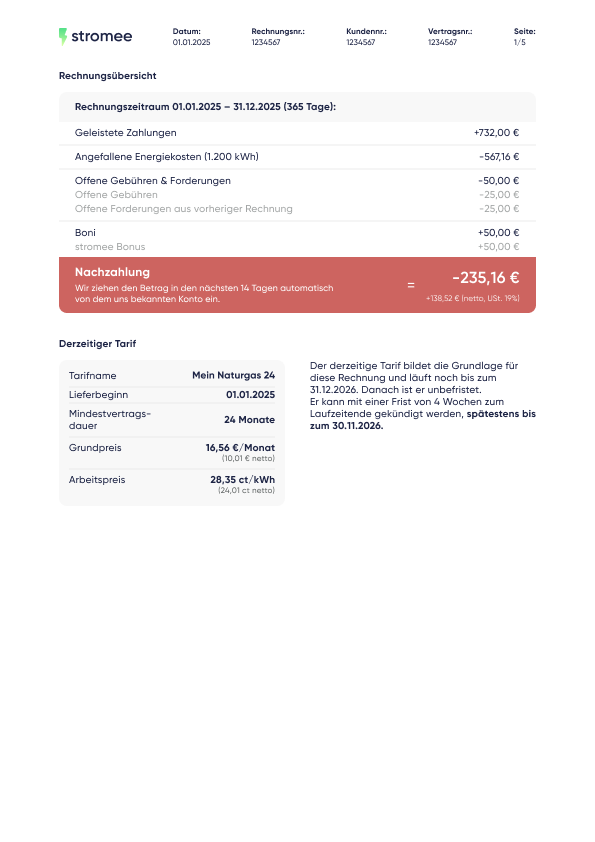
→ At a glance: “Additional payment,” invoice overview in red
SEPA
→ Note regarding direct debit
Cancelled
→ No installment payments visible at first glance, no installment plan


07 EXAMPLE INVOICE
Komplette Beispielrechnung: Privatkunde, Strom, weiterhin in Belieferung


